Palo Alto PSIRT Firewall Monitor
An AI agent reads the week's Palo Alto PSIRT advisories, queries your live PAN-OS firewall over MCP for its real model and running version, and emails you only when your device is actually affected. If nothing applies, you hear nothing. Shared as a worked example — the pattern matters more than the export, and every piece of it swaps to fit your own stack.
The Problem It Solves
Palo Alto Networks publishes security advisories (PSIRT) in batches — often a dozen or more at once, spanning PAN-OS, the GlobalProtect client, Cortex XSOAR, Prisma, and more. If you run a PAN-OS firewall, someone has to read every advisory, figure out which ones apply to your product, check the affected version ranges against the version actually running on your box, and decide whether to act.
Most teams either drown in irrelevant CVE noise or, worse, skim past the one advisory that matters. The tedious part isn't reading the feed — it's the correlation with your real environment. That's exactly what MCP was built for.
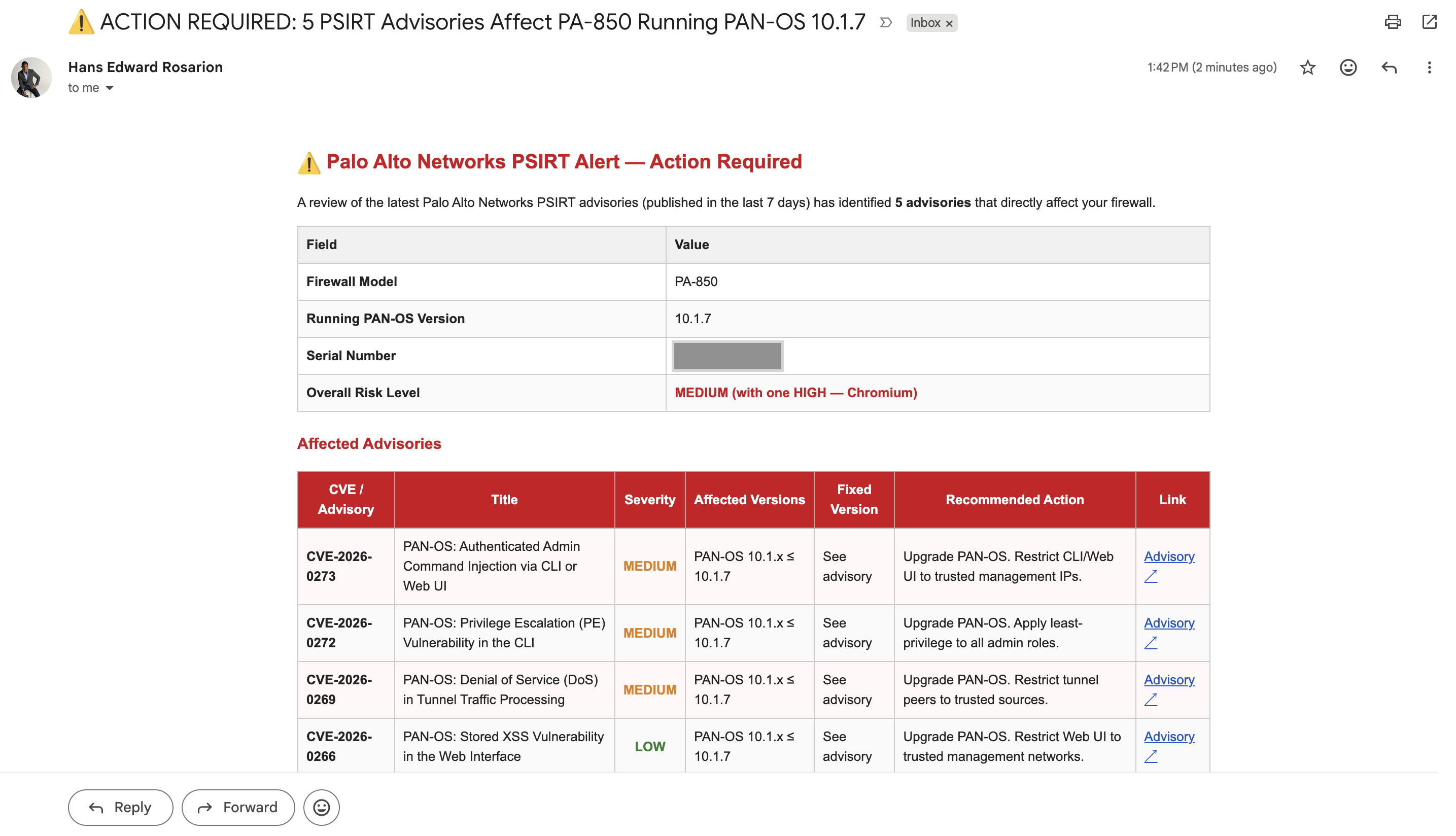
Every Monday at 8 AM, this workflow fetches the official PSIRT RSS feed, filters to recent advisories, and hands them to an AI agent (Claude) that calls MCP tools against your live firewall to get the real model and running PAN-OS version. The agent compares each advisory against your actual device and decides whether action is needed. If it is, you get one email: firewall model, running version, a table of only the advisories that affect you (severity, fixed version, recommended action, interim mitigations), and a list of the ones it ruled out and why.
The pattern generalizes: public vulnerability feed + MCP view of your real environment + an agent that correlates the two = alerts that are actually about you. Swap the feed and the MCP server and this becomes a Cisco PSIRT monitor, an Ubuntu USN monitor for a fleet, or a GitHub Advisory monitor for deployed services.
A Real Run
On our test run, the feed contained 13 advisories spanning PAN-OS, GlobalProtect App, Cortex XSOAR, Prisma Access Agent, and Prisma SD-WAN. The agent:
- Called
get_system_infoandget_version_infothrough the MCP gateway → found a PA-850 running PAN-OS 10.1.7 - Flagged 5 advisories as applicable — four PAN-OS CVEs plus the monthly Chromium bulletin
- Correctly excluded the other 8 as client-software or separate-product advisories that don't apply to a hardware firewall
- Sent a formatted HTML alert: "⚠️ ACTION REQUIRED: 5 PSIRT Advisories Affect PA-850 Running PAN-OS 10.1.7"
Total runtime: about 60 seconds, two MCP tool calls, one email.
How It Works, Node by Node
The whole workflow is six nodes, three of which are sub-nodes of the agent:
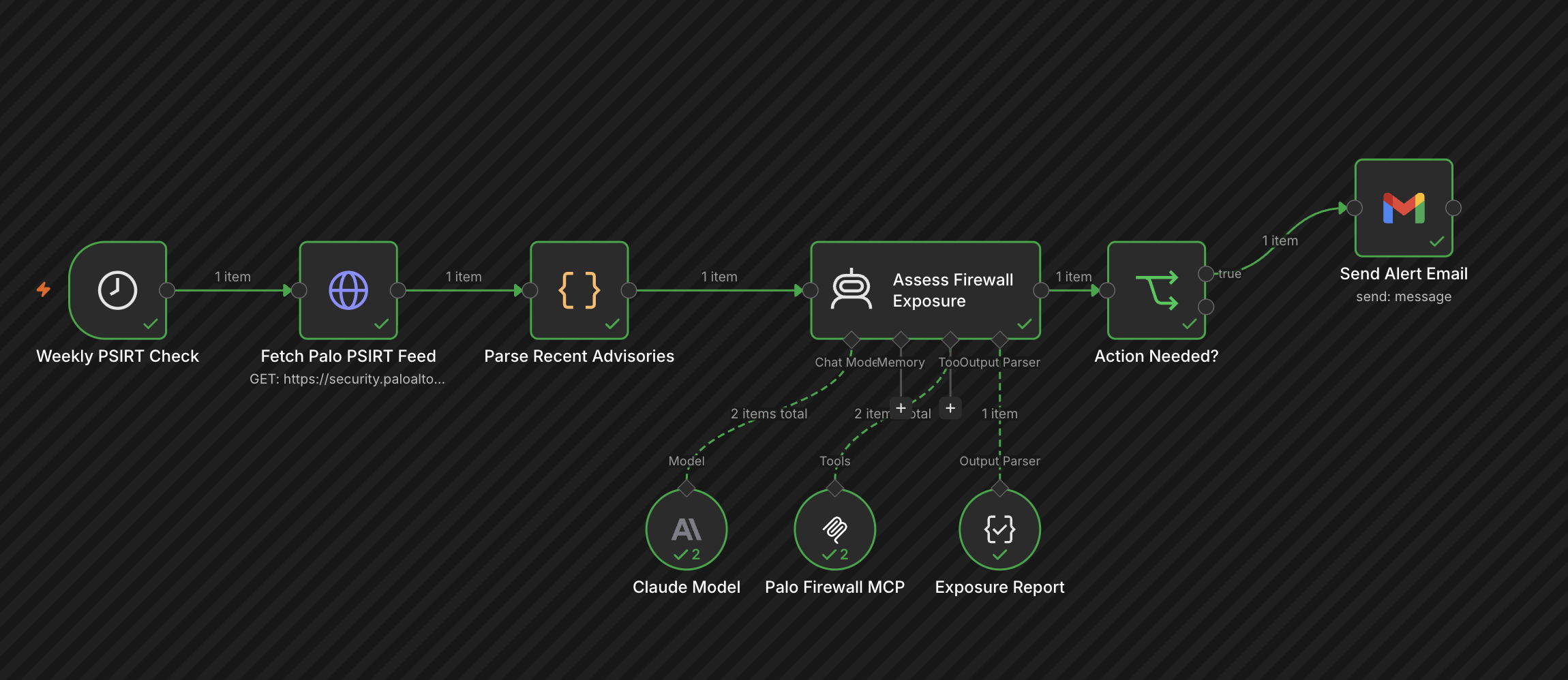
Schedule (weekly) → HTTP Request (RSS) → Code (parse + filter)
      → AI Agent ⟨ Claude model + MCP Client Tool + Structured Output Parser ⟩
      → IF (actionNeeded?) → Gmail
1 · Weekly PSIRT Check — a Schedule Trigger, Mondays 08:00.
2 · Fetch Palo PSIRT Feed — a plain HTTP Request to
https://security.paloaltonetworks.com/rss.xml, response as text.
3 · Parse Recent Advisories — a small Code node that parses the
RSS <item> blocks and keeps anything published in the last
30 days. If nothing is recent, it returns an empty array and the workflow ends
quietly.
4 · Assess Firewall Exposure — the AI Agent node, with three sub-nodes attached:
| Sub-node | Role | Detail |
|---|---|---|
| Claude Model | The reasoning engine | Anthropic chat model, temperature 0. |
| Palo Firewall MCP | Live device access | An MCP Client Tool pointed at a gateway that exposes PAN-OS tools like get_system_info, get_version_info, get_security_rules. The agent discovers and calls these on its own. |
| Exposure Report | Structured output | Forces the agent's answer into a strict JSON schema: actionNeeded, firewallModel, panosVersion, riskLevel, affectedAdvisories[], emailSubject, emailHtml. |
The system prompt tells the agent: never assume the firewall version — always call the tools. That single instruction is what turns this from "an LLM summarizing a feed" into "an agent auditing your actual infrastructure."
5 · Action Needed? — an IF node on
$json.output.actionNeeded. False → done, silently.
6 · Send Alert Email — a Gmail node. The agent already wrote the subject line and the full HTML body (table of affected CVEs, mitigations, links), so this node just sends it.
Why MCP Is the Star Here
Without MCP, this workflow would be a glorified RSS summarizer — the LLM could tell you "CVE-2026-XXXX affects PAN-OS 10.1" but not whether you are running 10.1. You'd still be doing the correlation by hand.
With an MCP gateway in front of the firewall:
- The agent has read-only, structured access to live device state — no SSH scripts, no scraping the web UI, no stale CMDB spreadsheet.
- Tool discovery is automatic — add more tools to the gateway (HA status, content versions, installed licenses) and the agent can use them without touching the workflow.
- The firewall never talks to the internet. The agent talks to the MCP gateway, and the gateway talks to the firewall's API with read-only tools.
The PAN-OS server behind this run is the same
Palo Alto Firewall MCP server
from the directory. This workflow only ever uses its read tools — and shipping
it with PANOS_ENABLE_WRITE=no makes that a guarantee rather than
a habit.
And none of it is Palo Alto–specific. The vendor here is the example, not the pattern. Every node in this workflow is a slot you re-fill to match your own environment:
| Slot | In this example | Swap it for |
|---|---|---|
| Advisory feed | Palo Alto PSIRT RSS | Cisco PSIRT, FortiGuard, Ubiquiti, Arista — whatever your vendor publishes |
| MCP server | PAN-OS firewall (read tools) | Any server in the directory — Meraki, FortiGate, ISE, UniFi, CloudVision |
| The check | Model + running PAN-OS version | Firmware, patch level, EOS image — whatever proves exposure on your gear |
| Alert channel | Gmail | Slack, Teams, SMTP, a ticket in your ITSM |
Same trigger, same agent, same correlation logic. Change the feed and the server, and this workflow watches your stack instead of ours.
Lessons Learned Building It
So you don't repeat them:
- Match your filter window to the publisher's cadence. Our first version filtered to advisories from the last 7 days. Palo Alto publishes roughly monthly — so most weeks the parse node returned an empty array and the workflow "succeeded" silently in 30 ms. It looked broken ("the parse node isn't working!") but the logic was fine; the window was just too narrow. We widened it to 30 days.
- Not every LLM can handle every MCP server's tool schemas. Our MCP gateway exposes ~96 tools. Google Gemini rejected the request outright with a
400 Bad Request— one tool's JSON schema used a union type ("type": ["string", "array"]) that Gemini's function-calling API doesn't accept. Claude handled the same tool list without complaint. If your agent dies before the first token with a schema error, try a different model before you start debugging your workflow. - Force tool use in the system prompt. Without "always call the tools — never assume the version," models will happily hallucinate a plausible PAN-OS version. Temperature 0 + explicit instruction + a structured output parser keeps it honest.
- Fail loud. The system prompt includes a rule: if the agent can't reach the firewall, it must set
actionNeeded: truewithriskLevel: "unknown"— so a broken MCP connection produces an alert email instead of silent false negatives. For security monitoring, an error should never look like an all-clear.
Import It Into Your Own n8n
The download is the exact workflow from the run above, sanitized: it contains no credentials, no internal hostnames, and no device identifiers. You plug in your own endpoints and credentials on import. To run it you'll need:
- n8n (self-hosted or cloud) — import the JSON via Workflows → Import from File.
- An Anthropic API credential for the Claude Model node.
- An MCP server for PAN-OS reachable from n8n — set its URL in the Palo Firewall MCP node (Streamable HTTP or SSE; add Bearer/Header auth if your gateway requires it).
- A Gmail credential — or swap the last node for Slack, Teams, SMTP, anything.
- Set your recipient address in Send Alert Email, activate the workflow, done.